
Email Digest for
July 6, 2025
Lenovo Chromebook Plus 14 Review (with Mediatek Kompanio Ultra 910)
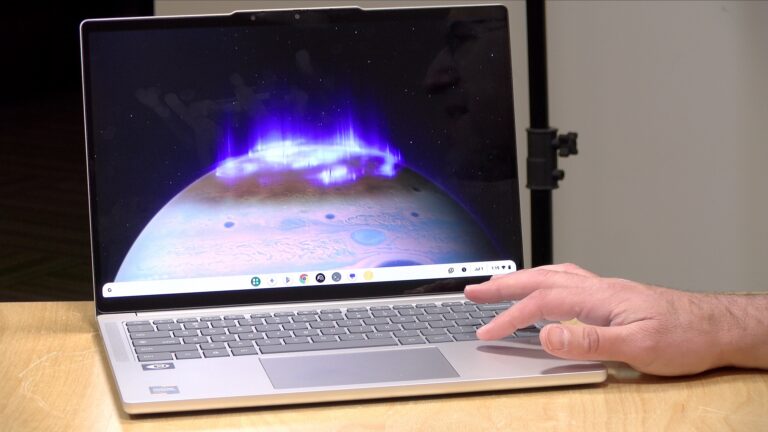
I got a chance to check out Lenovo’s new Chromebook Plus 14, powered by the MediaTek Kompanio 910 processor. I didn’t have high expectations going in—MediaTek hasn’t exactly been known for high-performance chips in the Chromebook space—but this one surprised me. It handled just about everything I threw at it with the kind of responsiveness I usually associate with Intel or AMD-based machines, and it stayed cool and quiet throughout thanks to its fanless design. You can see it in action in my latest review.
This particular configuration comes with 16GB of RAM and 256GB of storage, priced at $749 (compensated affiliate link). The entry-level version starts at $649, and both perform the same. As part of the Chromebook Plus program, buyers also get a year of Google’s Gemini Pro service included, along with two terabytes of cloud storage across their Google account. After the first year, subscription fees apply.
The 14-inch OLED touchscreen runs at 1920×1200 with a 60Hz refresh rate and maxes out at 400 nits of brightness. It’s sharp and vibrant, with a 16:10 aspect ratio that works well for productivity. The webcam clocks in at 1440p and includes some of those AI background effects Google has built into the Chromebook Plus version of the ChromeOS operating system. It’s not amazing, but it does the job. There’s also a physical privacy shutter.
Build-wise, the Chromebook feels solid with a mostly metal chassis, though there’s a bit of flex in the keyboard deck. The keyboard is standard Lenovo fare—comfortable, backlit, and roomy enough for extended typing sessions, even if the key travel is a little shallow. The audio quality was better than expected, with Dolby Atmos certification and a full, clear sound, especially for a Chromebook.
Ports are minimal: two USB-C ports (one on each side, both full-function but limited to 5Gbps), a USB-A port, and a headphone jack. It supports up to two external displays, though only one port could hit 60Hz, the other 30Hz, when I mixed adapters. Wi-Fi 7 support is on board, and I was able to hit close to gigabit speeds with a compatible access point.
Battery life is a standout. I got more than 13 hours out of it under typical Chromebook workloads, especially when keeping the OLED brightness in check. And since it’s completely silent and solid-state, it’s a very comfortable device to use on the go.
In terms of real-world performance, web browsing felt snappy and responsive. On the Speedometer benchmark, it scored a 25, which lines up with newer Snapdragon-powered Windows devices and outperforms some previous-generation Intel Chromebooks. It also had no trouble playing back 4K 60fps YouTube video.
One limitation to be aware of is streaming video apps. Netflix, for example, doesn’t output HD video through the Android app on Chromebooks due to DRM issues—something that’s been unresolved for years. The workaround is to use the Netflix website instead, where video plays back at full resolution.
This particular Chromebook Plus has two on-device AI features lacking on other Chromebook Plus devices. The first is a browser tab organizer can group tabs into virtual desktops based on topic. It worked, though not perfectly and it sometimes missed obvious groupings. The other feature, an on-device background removal tool for images, is not quite there yet. I tried it on a photo for a YouTube thumbnail and still needed additional edits afterward. Some of the Gemini-based tools integrated into Chrome OS—like article summaries and auto-writing—worked more reliably and were genuinely helpful for quick tasks.
Gaming and emulation performance was better than I expected. Android games like Wuthering Waves ran smoothly on balanced settings. I tried mapping touchscreen controls to a game controller (another Chromebook Plus exclusive feature) and it seemed to work well enough. I also ran the Dolphin emulator and tested out GameCube games. I experienced solid, full speed performance with room to push resolutions higher on some titles.
3DMark’s Wildlife test gave a score of 18,498 on the standard benchmark and 5,284 on the Extreme version. That puts it in the ballpark with many of its peers at this price point.
Linux support is present, as it is with most Chromebooks. I installed the Linux development environment, ran some command-line tools like Nano, and even launched graphical applications like LibreOffice. Everything worked, aside from a few window resizing quirks. It’s a useful feature for anyone interested in development or running more traditional desktop applications.
This Chromebook will be supported with security updates through June 2035, giving it a 10-year lifespan. That’s about as good as it gets on Chrome OS right now.
What stood out most was just how capable the MediaTek chip was. I’ve used a lot of Chromebooks over the years, and this one didn’t feel like it was held back by its processor. I’m curious to see whether MediaTek will be able to bring this same chip to the Windows ecosystem. Overall this is a strong showing for Chromebook users looking for a fanless, portable device with long battery life and decent performance across the board.
See more Chromebook reviews here!
Disclaimer: Lenovo provided the Chromebook on loan for this review. They did not review or approve this content before it was uploaded and this is not a sponsored review.
Automating Your Media with the Plex Watchlist RSS Feed!
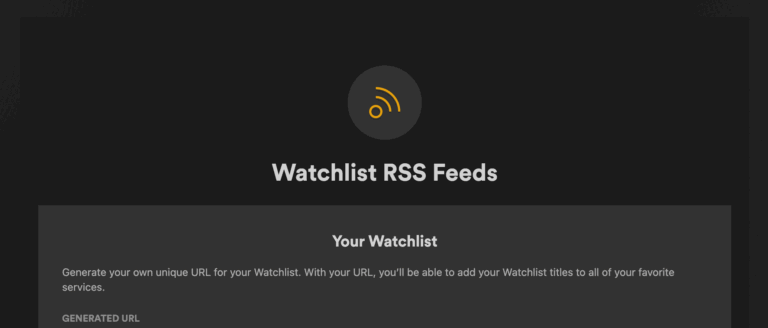
Plex has been sponsoring a monthly video on my channel for a while now, and this month I took another look at one of my favorite features: the watch list and its RSS feed that allows for many more uses. You can see it in action in my latest Plex Video.
One of the things I really appreciate about Plex is the strength of its universal search engine. For instance, if I search for Star Trek: Deep Space Nine, I can not only explore every season of the show but also see where it’s available to stream, even if it’s not on one of my own Plex servers. It gives me a single place to bookmark anything I want to watch, so later I can sit down at the TV, pull up my list, and head straight to whatever I’m in the mood for. It’s a really convenient system, especially when someone recommends a show—just hit the watch list button, and it’s waiting for you at home.
What the watch list doesn’t do, though, is notify you when a new season or episode is available. It does have a shelf on its recommendation page, but it’s not front and center. That got me thinking—could I build something to fill in that gap? I started playing around with the RSS feed Plex generates for your watch list. It’s turned off by default, but once enabled under your Plex Pass account settings, it gives you a URL to a standard XML file. That feed includes metadata like titles, summaries, and most importantly, the TVDB or IMDb ID for each item. That opened the door to building something a little more customized.
With a little help from AI, I created a Python script that parses the RSS feed, connects to the TVDB API, and pulls in the next known air date for each show. The script runs in the terminal and outputs a table sorted by upcoming release dates. Right now it’s basic, but it could easily be extended to integrate with Home Assistant or another tool for sending notifications. I’ve already got it tracking things like the next season of Squid Game and Stranger Things, along with upcoming episodes of Skinwalker Ranch and Star Trek: Strange New Worlds.
I also had the AI write a PHP version of the script that looks better in a web browser.
Code for both versions are available here. Even without programming, you can do simple things like ask ChatGPT for sci-fi shows that aren’t already in your feed. That alone gave me a few new ideas for what to add to my list.
This RSS feature is easy to access and doesn’t require an API key. If you’re comfortable with a little coding—or even just working with a chatbot to help—you can build something that extends what the watch list already offers. If you’re doing anything creative with your own watch list RSS feed, I’d love to hear about it.
Items for Sale / Auction:
Switch 2 Joy-Con 2 Charging Grip (Brand New in Box)Movo Phone Video Kit - Includes grip, light, mic and more
Wavlink Thunderbolt Hub / Docking Station
Kensington LD5400T Thunderbolt 3 Dual 4K Dock w/K-Fob Smart Lock, 85W
Crossbows and Catapults game (2024 remake)
For Sale : A number of Kensington VESA display mounts on my Ebay page.
Today's Links:
YouTuber Harke Discovers Microsoft's 1990s Era Procedural Music GeneratorIconic Arcade Chain "Chuck E. Cheese" Launches New Locations Aimed At Nostalgic Adults
Cloudflare will block AI scraping by default and launches new "Pay Per Crawl" marketplace
Christopher Dring: The Xbox we knew is dead
Google will reduce battery life for some Pixel 6a phones on July 8th to reduce risk of overheating
You Own Nothing: SNK Just Delisted A Bunch Of Its Games From The Google Play Store
A Look Inside the Making of "The Secret of Skinwalker Ranch"
Brazil Sues Nintendo For EULA That Allows It To Brick Switch 2 Consoles
NVIDIA's DLSS Transformer Tech Slashes VRAM Usage By 20%
Judge OKs sale of 23andMe to a nonprofit led by its founder
Film Adaptation of Andy Weir's "Project Hail Mary" Gets a Trailer
Senate GOP budget bill has little-noticed provision that could hurt your Wi-Fi
NASA+ is Coming to Netflix This Summer
Internet Archive says Anthropic AI ruling is a win for libraries too
Beloved Commodore May Rise From The Ashes As Retro Community Takes Over
Revealing The Last Mac Easter Egg
Latest Videos:
How To Unlock a More Powerful Plex Watch List !
No More Data Caps on Comcast / Xfinity! But you gotta call..
Lenovo Legion Go S with SteamOS Review ! First Licensed SteamOS Handheld
Beelink ME Mini NAS / Server Review - Six NVME Slots for Compact Storage
Here's Why Your Cable / Streaming TV Bills Keep Going Up
Sandisk Creator Phone SSD Review - It Doesn't Trip the iPhone's Circuit Breaker
8BitDo Controllers on Switch 2? Let's Test!
Android 16 Beta Turns Pixel Phones into a Desktop—Sorta..
GTBox G-Dock Review - eGPU Dock for Oculink/Thunderbolt/USB 4 With Integrated Power Supply!