
Weekly Email
For June 1, 2025
Latest Videos:
Make Your Own Streaming TV Channel with Plex and ErsatzTV !
Onn 4k Plus Google TV (2025 Version) Review - Walmart's Great $30 Streaming Device
I got into the T-Mobile Starlink Beta...
Make Your Own Streaming TV Channels with Plex and ErSatzTV (sponsored post)
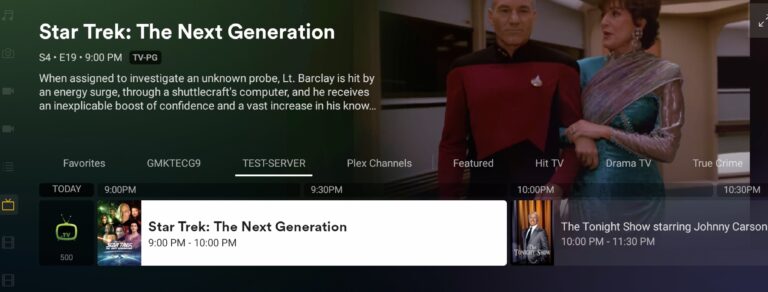
For my latest monthly sponsored Plex video, I took on a fun project that turned my Plex library into a fully programmed, always-on TV channel. Using an open-source tool called ErsatzTV, I set out to recreate the experience of traditional broadcast television—with scheduled shows, filler ads, and a sense of timing you just don’t get from on-demand shuffling.
I step through how to get it up and running in my latest video.
The idea behind ErsatzTV is pretty straightforward: it links into your Plex server and plays back episodes from your media library on a set schedule. It even keeps track of what episode aired last, so it will step through a season of a show each day or week. It can also shuffle episodes each time. If you tune in halfway through, that’s where you start watching—just like the old days.
To make it work with Plex, you do need a Plex Pass since it ties into the live TV and DVR features.
I installed ErsatzTV on a Windows machine for demonstration purposes, but it’s cross-platform, and you can run it on Linux, macOS, or via Docker. After downloading and extracting the app, I launched the server and configured it through the web interface. The first tweak was enabling hardware acceleration for better performance, which in my case meant selecting the VAAPI option for Intel graphics.
From there, I connected ErsatzTV to my Plex server and synced my TV show library. My mix included old episodes of David Letterman and Johnny Carson, Star Trek: The Next Generation, some 80s cartoons, and a healthy dose of Bluey for the kids. I also added a folder of vintage commercials and PSAs as filler content to help round out the schedule to clean half-hour or hour blocks.
ErsatzTV doesn’t let you slot individual files—everything has to be bundled into collections. So I grouped the ads into a “filler” collection and set up presets for midroll and fallback padding. This way, the system could drop in the right number of ads to stretch shorter content to the next block precisely.
Then came the fun part: building out the channel. I created a schedule starting at 6 a.m. with “Star Blazers and “He-man”, Bluey from 9 to 1, some afternoon Star Trek, and nighttime talk shows beginning at 10 p.m. with Johnny Carson. I used a mix of fixed and dynamic scheduling depending on the content length. ErsatzTV handled the logic to round everything off nicely with filler content when needed.
Once the channel was ready, I registered ErsatzTV as a tuner device inside Plex using its HDHomeRun emulation feature. That let me pull the guide data from ErsatzTV’s built-in XMLTV feed, and just like that, my custom channel showed up alongside my antenna broadcasts. Everything worked as expected: metadata, descriptions, proper timing—it all lined up. If I tuned in late, I caught shows mid-episode, and the transition between shows and filler felt natural.
There’s definitely something satisfying about turning Plex into a virtual broadcast network. It’s more work than hitting “shuffle,” but the end result feels more alive. There’s structure, nostalgia, and the bonus of always having something ready to play, exactly when and where I want it. Now that the framework is in place, I can add more shows, create additional channels, or even bring back “Tuesday Night Movies.” The only real limit is how much media I can cram onto my server.
See more of my Plex videos here.
Disclosure: This was a sponsored video from Plex, however they did not review or approve this before it was uploaded.
For Auction: Mayflash F700 Arcade Stick

This is the Mayflash F700 Arcade Stick that I reviewed here! This is a nice arcade stick with lots of compatibility. It’s pretty beefy too. These are selling new for $149. Auction closes on Monday afternoon.
Find the auction here.
Note that you will need to register first if you haven’t already- you’ll get prompted to do so when you place a bid. You can also register first at http://lon.tv/auctionregister . You’ll see a WordPress login as this is a plugin running on my WordPress site.
Want to get notified of future sale items and auctions? Sign up for my Store Alert Email here!
Walmart Onn 4k Plus Google TV Streaming Box Review
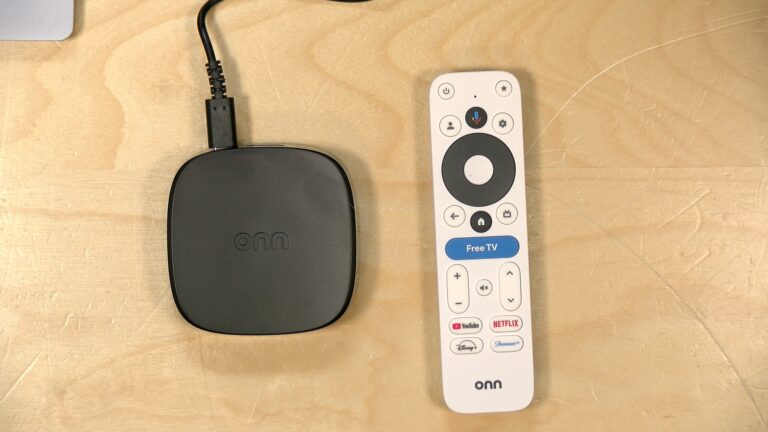
Walmart just refreshed their sub $30 Google TV device with the new Onn 4K Plus (compensated affilate link). These are designed mainly for situations where a TV’s smart features are outdated or no longer functional, and in that context, it ends up being a surprisingly capable solution that feels a lot more powerful than its predecessor.
You can see it in action in my latest video review.
The device itself is a small puck—slightly larger than the last version—with HDMI out, a USB-C port for power, and a reset button. Performance over Wi-Fi was surprisingly solid. It supports Wi-Fi 6 and pulled around 430 Mbps down and up.
The 4k Plus supports USB-C hubs for peripherals, and I was able to get Ethernet working through one, though compatibility was inconsistent depending on the adapter. It looks as though the port is limited to USB 2.0 speeds as the best I could get out of my adapter was 100 megabits per second.
Internally, this version runs on an Amlogic S905X5M processor with 2GB of RAM and 16GB of storage. That’s a bump up in both performance and storage compared to earlier models. It still won’t satisfy power users, but general performance is responsive, especially when navigating Netflix and other streaming apps. The interface felt much zippier than I expected for this price point.
It runs Android 14 under the hood, and the front-end experience is standard Google TV, which remains very ad-centric. You’re presented with promotions and suggestions based on viewing habits, and it integrates content from services that support Google’s recommendations. The usual suspects like Netflix, Disney+, and YouTube are present, although there are some quirks—Netflix shows can’t be added to the watchlist, for example. That’s a long-standing limitation tied to how Netflix handles integration.
The remote includes voice control, which worked well for searches, and a new “Free TV” button that jumps into Google’s curated free content offering. It’s not vastly different from what Roku or other aggregators do, but Google has added a prominent shortcut to it on the remote to steer users onto their free platform.
Video and audio performance was mixed depending on the app. Netflix ran fine with Dolby Vision and Atmos audio on my 4K setup, but Disney+ didn’t deliver Atmos, and also failed to switch into 24p mode for content that needed it. This isn’t unusual—frame rate switching has been a persistent issue on Android boxes. You can enable it in settings, but results still vary app by app. Netflix behaved the best in my testing.
Gaming was better than expected. Android games ran smoothly, and GeForce Now performed decently over Wi-Fi at 1080p60. There was one crash and reboot, possibly related to the 2GB RAM ceiling, but overall stability was reasonable. Emulation is limited; PlayStation 1 works, but GameCube and PS2 emulators wouldn’t install.
As a Plex client, it handled browsing quickly, which made navigating a large local library feel snappy. But it lacks features more serious users might expect—no support for Dolby Vision from Blu-ray rips or lossless audio passthrough. So while it’s fine for casual Plex use, it’s not going to replace a higher-end setup in a home theater environment.
This box isn’t for enthusiasts, but it’s the kind of product they might still find a use for in a guest room or second TV. For most people, especially anyone looking to upgrade an old smart TV without spending much, it feels like a substantial upgrade. Even if it’s not perfect, it is probably the most value packed TV box on the market.
I tried the T-Mobile Starlink Beta..
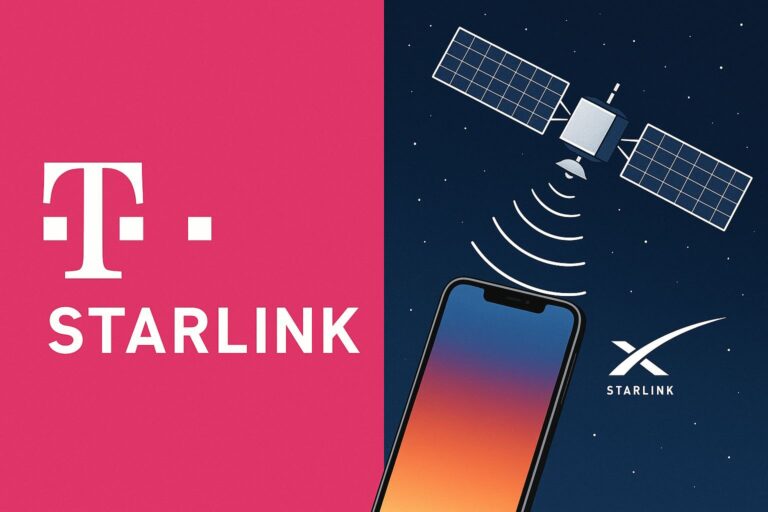
I signed up for the free T-Mobile beta that connects your smartphone directly to a SpaceX Starlink satellite—no dish required. It’s a glimpse into what satellite-to-phone communication might look like in the near future, although it’s still limited in what it can actually do right now. You can learn more in my latest video.
The beta is available at no cost, and you don’t need to switch your carrier to try it. In my case, it added an eSIM to my iPhone while keeping my Verizon service intact. After 90 days, it auto-enrolls you in a paid plan, so keep that in mind if you’re a tire kicker like me. Only certain phones are compatible, including the iPhone 13 and newer, Google Pixel 9, along with several Samsung Galaxy and Motorola Razr models.
The satellite signal will only activate if you’re in a complete T-Mobile dead zone. You can’t manually switch to satellite if there’s even a faint tower signal nearby. That was a bit of a letdown, since I was hoping for more flexibility in testing.
There is a good dead zone near the small airport where I take flight lessons. When I parked in the nearby Dunkin’ Donuts parking lot, my phone picked up the satellite signal—weak, but functional. Interestingly, the signal worked better inside my car, likely because of the glass roof. As soon as I stepped out, my phone found a ground tower and switched over.
Once connected, my phone displayed “T-Mobile SAT” vs. the LTE or 5G icon I normally see. I received a welcome text confirming I was on satellite and reminding me I could only send and receive text messages.
I tested it by sending a message to my wife, who got it without issue and responded back. The message showed “delivered” almost immediately, which made the experience feel just like using a traditional tower, at least in terms of texting.
That’s really the extent of it. It only supports SMS and iMessage at the moment—no images, no videos, no calls, and no other data activities. T-Mobile says more is coming, but for now, it’s strictly for texts.
I was hoping for a bit more functionality out of the beta—maybe some light data usage or app access—but the reality is that we’re not quite there yet. More direct-to-cell capable Starlink satellites are slowly being added, and once the newer models are in place, T-Mobile’s satellite service will likely grow into something much more usable.
I also looked into Apple’s Emergency SOS feature on the iPhone, which is similar but a bit more involved. You need to manually aim your phone at a satellite and recipients have to opt-in to reply via satellite. Apple’s system is currently free for two years after purchase, though there’s no word yet on what happens after that.
Over the past week, I’ve been running both T-Mobile and Verizon connections on my iPhone to compare network performance since my phone now has T-Mobile’s 5G service. At home, both are mediocre, though T-Mobile edged out Verizon in downstream speed. But in better-served areas, T-Mobile showed a stronger upload rate.
I hope additional satellite functionality gets enabled prior to my 90 day trial expiring. If more features are added before then I will definitely post a followup.
Older Videos:
Unifi Flex 2.5G POE Switch Review : 8x 2.5 Gig Power over Ethernet Ports
Out of the Box Meshtastic! Heltec Pocket Mesh Powerbank & My NYC Mesh Experience!
I bought a new printer! Brother Color Laser HL-L8360CDW Review
My Channel is Infested with P*rnbots ! Here's where they take you..
Dusting off the Nintendo 64 Part 2! Modern controllers with the BlueRetro Adapter!
8bitdo Retro R8 Gaming Mouse Review
ATSC 3 Update: Sinclair Accuses us of Astroturfing DRM Nextgen TV Concerns for Cord Cutters
Asus ZenWifi Wi-Fi 7 Mesh System Overview: BD5, BD5 Outdoor, BT8 & BT10
How to spot a scam sponsorship request! #creator #creatoreconomy
Items for Sale / Auction:
For Auction : Mayflash F700 Arcade Stick
Brook Powerbay Nintendo Switch Dock
Movo Phone Video Kit - Includes grip, light, mic and more
Visiontek VT350 USB-C Portable Dock
Wavlink Thunderbolt Hub / Docking Station
Kensington LD5400T Thunderbolt 3 Dual 4K Dock w/K-Fob Smart Lock, 85W
Crossbows and Catapults game (2024 remake)
For Sale: Kensington KP400 Switchable Wired / Bluetooth Keyboard
For Sale : A number of Kensington VESA display mounts on my Ebay page.
Today's Links:
Federal Court Blocks Trump Tariffs That Could Have Pushed iPhone Prices to Over $4,000
Best Buy warns tariffs may drive up prices
Closed captions on DVDs are getting left behind
The Information: Apple rejected Elon Musk’s satellite offer, now its plans are in jeopardy
Scientists are using AI technology to speak whale
A tour of a mid-90s consumer electronics super store
Here's how Veronica Explains edits video in Linux
Researchers Search for the Mystery Photographer of San Francisco
Man wakes up to find a giant cargo ship in his yard